T아카데미 - 컨테이너 오케스트레이션 쿠버네티스 살펴보기
Task 1. kubectl
- 쿠버네티스의 API 서버와 통신하기 위해 사용
- alias k='kubectl' 을 입력하여 사용하기 쉽게 만들자
- 기본 명령어
* apply : desired status 적용
* get : 현재 리소스의 목록 조회
* describe : 상세 내용 조회
* delete : 해당 리소스 삭제
* log : 로그 조회
* exec : 해당 컨테이너로 접속
- 명령 vs 선언
# 명령
kubectl scale --replicas=3 rs/whoami

# 선언 (실제 운영에서 사용됨)
apiVersion: apps/vlveta2
kind: replicaset
metadata:
	name: whoami
spec:
	replicas:3
- 기본 오브젝트
다음 오브젝트들을 생성하고 조회하고 삭제하는 작업을 합니다.
* node : k get node
* Pod : k get pod
* ReplicaSet
* deployment
* service : k get service
* loadbalancer
* Ingress
* volumes
* configmap
* secret
* namespace
* 전체 오브젝트 조회 k api-resouces
- 다양한 사용법
* get
# pod, replicaset, deployment, service 조회
kubectl get all

# node 조회
kubectl get no
kubectl get node
kubectl get nodes

# 결과 포멧 변경
kubectl get nodes -o wide
kubectl get nodes -o yaml
kubectl get nodes -o json
kubectl get nodes -o json |
	jq ".items[] | {name:.metadata.name} + .status.capacity" # json 특정 값 찾기
* describe
# kubectl describe type/name
# kubectl describe type name
kubectl describe node <node name>
kubectl describe node/<node name>
* 그 외 자주 쓰이는 명령어
kubectl exec -it <POD_NAME>
kubectl logs -f <POD_NAME|TYPE/NAME>

kubectl apply -f <FILENAME> ★
kubectl delete -f <FILENAME> ★
Task 2. Pod
- 명령어

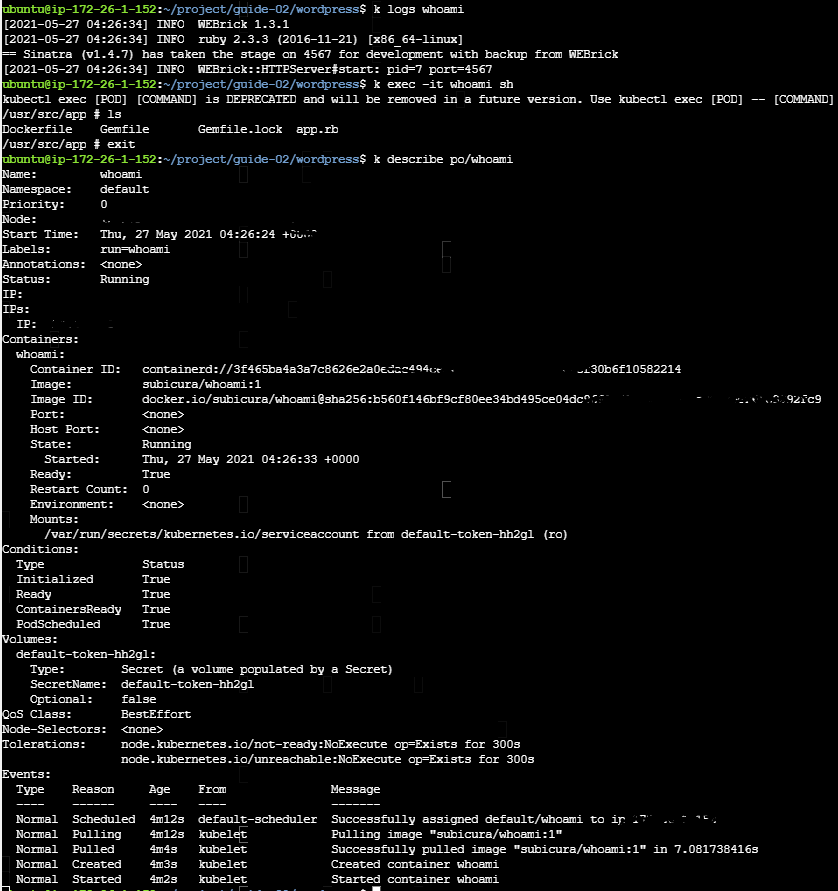
- YAML 파일
#guide-03/whoami-pod.yml
apiVersion: v1 #필수
kind: Pod #필수
metadata:
	name: whoami
	labels:
type: app
spec:
	containers:
	- name: app
	image: subicura/whoami:1

# 적용
k apply -f whoami-pod.yml
k delete -f whoami-pod.yml
- Pod Ready

* app 이 생성 된 후, 상태 값 체크 - livenessProbe
apiVersion: v1
kind: Pod
metadata:
  name: whoami-lp
  labels:
    type: app
spec:
  containers:
  - name: app
    image: subicura/whoami:1
    livenessProbe:
      httpGet:
        path: /not/exist
        port: 8080
      initialDelaySeconds: 5
      timeoutSeconds: 2 # Default 1
      periodSeconds: 5 # Defaults 10
failureThreshold: 1 # Defaults 3 
* 준비가 되어 있는지 조사 - readinessProbe
apiVersion: v1
kind: Pod
metadata:
name: whoami-rp
labels:
  type: app
spec:
containers:
- name: app
  image: subicura/whoami:1
  readinessProbe:
    httpGet:
      path: /not/exist
      port: 8080
    initialDelaySeconds: 5
    timeoutSeconds: 2 # Default 1
    periodSeconds: 5 # Defaults 10
failureThreshold: 1 # Defaults 3 
* health check 예제 (실제로 살아있는 포트 헬스체크)
apiVersion: v1
kind: Pod
metadata:
name: whoami-health
labels:
  type: app
spec:
containers:
- name: app
  image: subicura/whoami:1
  livenessProbe:
    httpGet:
      path: /
      port: 4567
  readinessProbe:
    httpGet:
      path: /
port: 4567 
* multi container 예제
apiVersion: v1
kind: Pod
metadata:
  name: whoami-redis
  labels:
    type: stack
spec:
  containers:
  - name: app
    image: subicura/whoami-redis:1
    env:
    - name: REDIS_HOST
      value: "localhost"
  - name: db
    image: redis


- Exam1. Pod 만들기

* 나의 답변 (정답~)
#mongodb.yml
apiVersion: v1
kind: Pod
metadata:
  name: mongodb
  labels:
    type: mongo
spec:
  containers:
  - name: mongodb
    image: mongo:4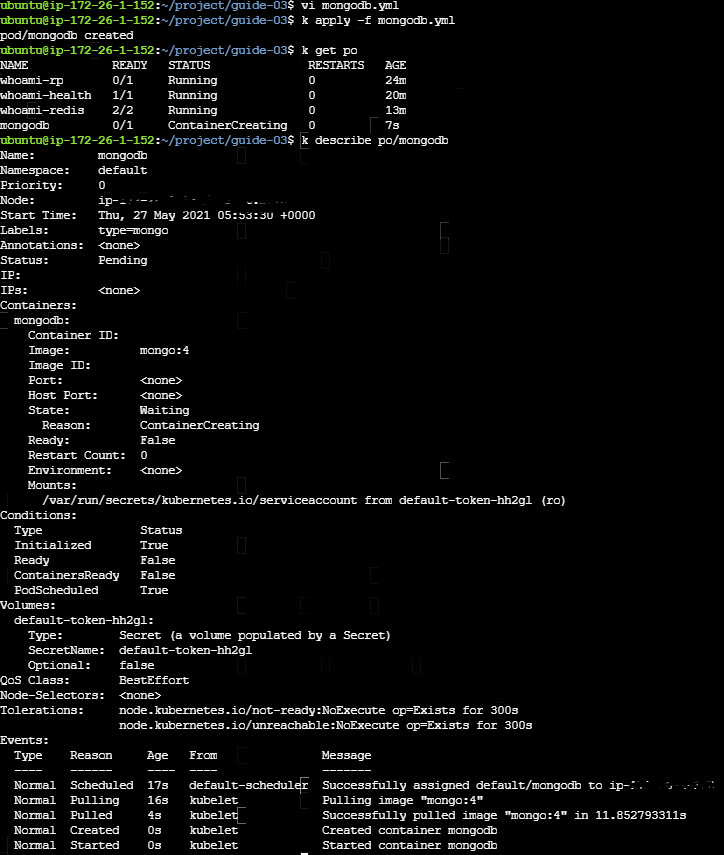
Task 3. Replicaset
- 기본 예제
apiVersion: apps/v1beta2 #필수
kind: ReplicaSet #필수
metadata:
  name: whoami-rs #필수
spec:
  replicas: 1 # 해당 리플리카셋의 복제셋은 1개
  selector:  # type이 app인 whoami 서비스가 하나가 있는지 체크
    matchLabels:
      type: app
      service: whoami
  template: # 체크를 했는데 해당 팟이 없으면, 하단 팟을 만들겠다.
    metadata:
      labels: #필수
        type: app
        service: whoami
    spec:
      containers:
      - name: whoami
        image: subicura/whoami:1
        livenessProbe:
          httpGet:
            path: /
            port: 4567
- https://kubernetes.io/ko/docs/concepts/workloads/controllers/replicaset/ 참고

- type=app, service=whoami 인 팟 1개를 계속해서 유지함

- Exam 1. 다음 조건을 만족하는 replicaset을 만들어 보세요.
* 나의 답변 (정답~)
apiVersion: apps/v1
kind: ReplicaSet
metadata:
  name: nginx
spec:
  replicas: 3
  selector:
    matchLabels:
      type: nginx
      service: whoami
  template:
    metadata:
      labels:
        type: nginx
        service: whoami
    spec:
      containers:
      - name: nginx
        image: nginx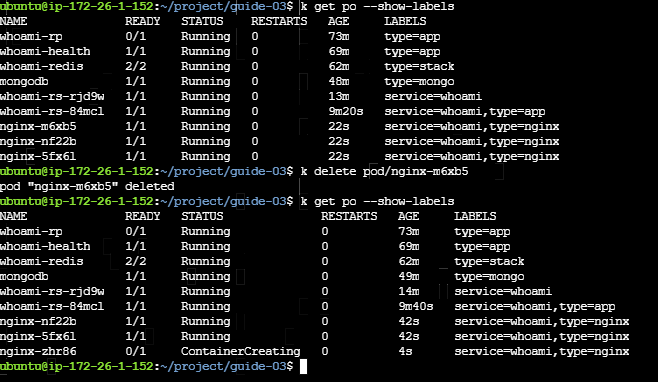
Task 4. Deployment
- Deployment = replicaset + 버전관리 + 롤백기능
- 기본예제
apiVersion: apps/v1beta2
kind: Deployment
metadata:
  name: whoami-deploy
spec:
  replicas: 3
  selector:
    matchLabels:
      type: app
      service: whoami
  template:
    metadata:
      labels:
        type: app
        service: whoami
    spec:
      containers:
      - name: whoami
        image: subicura/whoami:1
        livenessProbe:
          httpGet:
            path: /
            port: 4567
- deployment 생성시 replicaset, pod 생성됨

- 이미지 버전 변경 시 , 원래 있던 3개 pod 이 종료되고 새로이 3개가 생김
- 리플리카셋이 1개 -> 2개로 변경됨

kubectl rollout history -f whoami-deploy.yml 히스토리 조회
kubectl rollout history -f whoami-deploy.yml --revision=2 해당 리비전의 히스토리 조회
kubectl rollout undo deploy/whoami-deploy --to-revision=3 해당 리비전으로 undo
'Devops > kubernetes' 카테고리의 다른 글
| 쿠버네티스 실습 1 - 클러스터 생성 (0) | 2021.06.18 |
|---|---|
| Kubernetes(쿠버네티스) 실습 2 (service/load balancer/ingress) (0) | 2021.06.01 |
| Docker-Compose(도커 컴포즈) 실습 (0) | 2021.06.01 |
| Docker(도커) 실습 (0) | 2021.06.01 |
| 실습 환경구성 (0) | 2021.06.01 |